Overview
- Role
- Project Manager
- Timeline
- Sep — Dec 2025
- Team
- 5 (Project Manager + 4 UX Designers)
- Tools
- Figma · Adobe
TL;DR
As project manager, I led a team of five through Atlas Digital Consulting Group to design a careers microsite for U-M's Division of Public Safety and Security. We turned a job-listings page into a welcoming, accessible recruitment experience, with storytelling, scannable job cards and a simpler path to applying, delivered as an implementation-ready prototype for DPSS's hiring campaign.
- 14 wkTimeline
- 3Core pages designed
- 5User personas
- 6Career sites analyzed
DPSS: A Great Place to Work is a UX design project completed through Atlas Digital Consulting Group, where our team partnered with the University of Michigan’s Division of Public Safety and Security to design a careers-focused microsite. The goal was to clearly communicate DPSS’s values, highlight career opportunities beyond law enforcement, and create a more approachable, community-centered recruitment experience.
This was a design-only project, with a team composed entirely of UX designers and no developers.
The problem
The current site struggles with
- Careers experience focused mainly on job listings, not storytelling
- DPSS’s mission and values were not clearly communicated
- Non-law-enforcement roles were underrepresented
- External applicants faced confusion and friction when applying
This project aimed to
- Clearly communicate DPSS’s mission and community impact
- Highlight diverse roles across the organization
- Create a welcoming, accessible careers experience
- Reduce friction in job exploration and application
- Support both desktop and mobile users
How might we…
How might we create a clearer, more welcoming careers experience that helps candidates understand DPSS and easily explore job opportunities?
Discovery & research
Understanding the landscape
From initial client meetings, we identified key constraints and opportunities:
- Accessibility PriorityPDF brochures needed web alternatives
- Technical ContextDesign for Sanity CMS implementation
- Brand AlignmentFollow UMich brand guidelines with DPSS nuances
- Audience DiversityServe everyone from external law enforcement candidates to current students
Competitive analysis
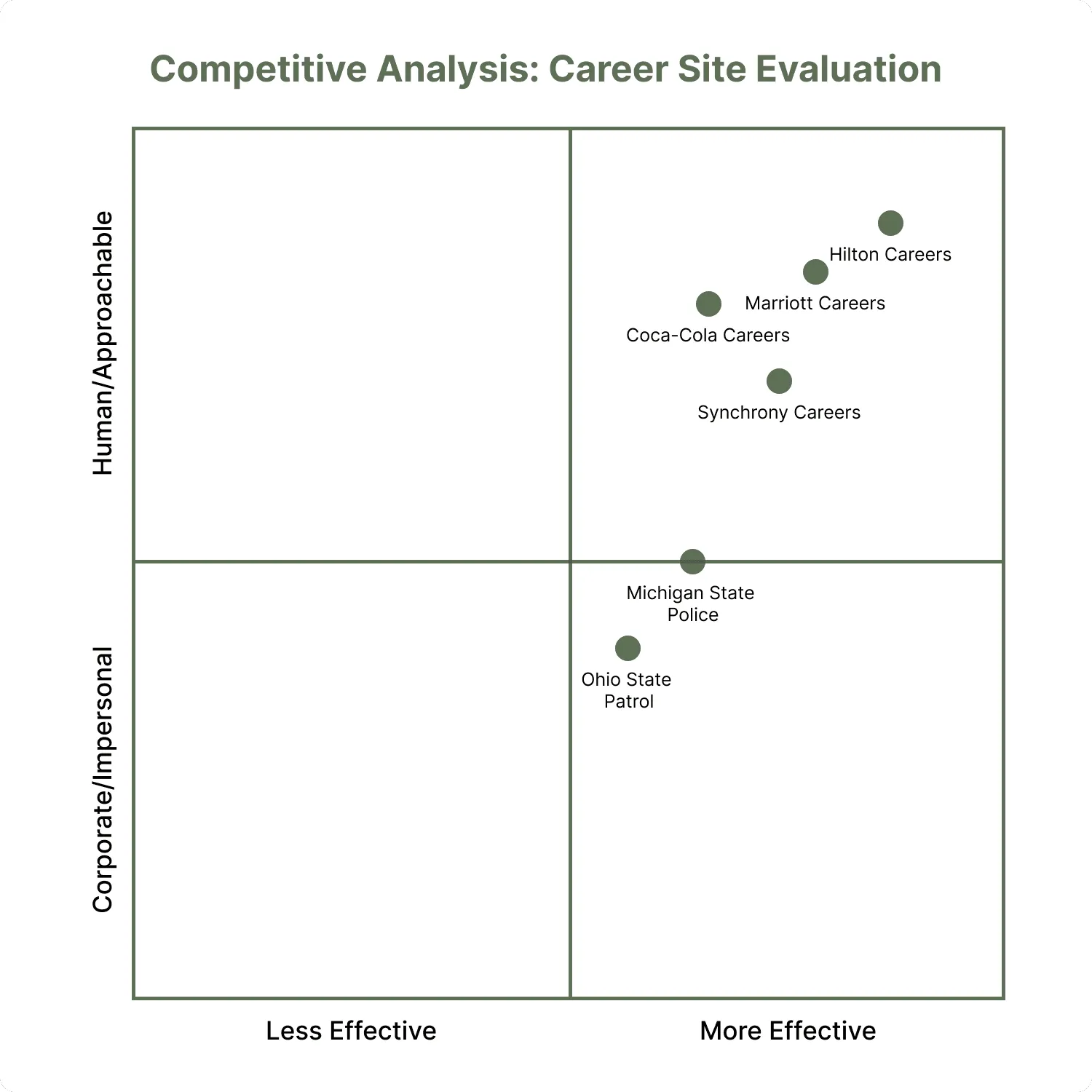
Our team reviewed six career sites (Hilton, Marriott, Coca-Cola, Synchrony, Michigan State Police and Ohio State Patrol). The analysis revealed a clear gap: public safety career sites tend to emphasize functionality over emotional connection, while hospitality sites excel at human storytelling but often lack institutional credibility.

User personas
We developed 5 detailed personas to guide design decisions. Each included specific goals, needs, and frustrations that directly informed our design priorities.

User persona
Jordan Ellis, The Local Candidate
Jordan currently works at a Michigan municipal police department and is exploring opportunities at U-M DPSS for career growth.
- Age
- 29
- Role
- Community Safety Officer
Goals
- Learn about the hiring process, qualifications, and benefits at DPSS
- Understand DPSS’s organizational culture, mission, and training opportunities
- Find clear instructions on how to apply and track the application status
Needs
- Transparent information on pay scales, diversity initiatives, and professional development
- Easy navigation to job listings and required certifications
- Examples of employee stories or testimonials to understand workplace culture
Frustrations
- Confusing job categories or unclear differences between DPSS units (e.g., police, security, transportation)
- Outdated or hard-to-find application portals
- Lack of visibility into advancement pathways or day-to-day duties

User persona
Taylor Robinson, The External Applicant
Taylor has eight years of experience in private campus safety but no prior connection to the University of Michigan or the state of Michigan.
- Age
- 33
- Role
- Security Supervisor at a private university in Illinois
Goals
- Quickly grasp DPSS’s scope, divisions, and culture
- Evaluate whether relocation to Ann Arbor is worthwhile
- Identify how to apply and what distinguishes DPSS from other university safety divisions
Needs
- A clear overview of DPSS’s mission, size, and units
- Transparent information about pay, relocation assistance, and career trajectory
- A strong sense of DPSS’s workplace culture and community impact
Frustrations
- Institutional jargon or acronyms (e.g., “DPSS,” “UM Safe,” “Division of Student Life”) that aren’t explained
- Difficulty understanding how U-M differs from other campuses in structure and expectations
- Limited information about Ann Arbor lifestyle and relocation logistics

User persona
Melissa Edwards, DPSS Administrative Coordinator
Melissa has had 5 years of experience working in university administration. She has training in crisis communication basics, records management, customer service and public information standards.
- Age
- 35
- Role
- Full-time DPSS Administrative Coordinator
Goals
- Ensure that applicants can easily find information about job roles and submit applications
- Maintain accurate, up-to-date website content about DPSS’s mission, services, and resources
- Streamline administrative tasks such as communication updates, information requests, and documentation
Needs
- A clean, easy-to-edit structure for updating pages and resources
- Clear explanations of DPSS roles to help answer inquiries
- A centralized hub for mission, values, services, FAQs, and contact info
- A clear recruitment/role overview page for multiple job types (security, emergency management, administrative, IT, etc.)
Frustrations
- The public may have misconceptions about DPSS’s role (e.g., thinking it is only policing/security)
- Outdated or scattered information increases the number of general inquiries Melissa must respond to
- Difficulty centralizing resources for both internal staff and campus community audiences

User persona
Dr. Amira Shah, The Policymaker
Amira oversees campus partnerships related to safety, emergency management, and student well-being.
- Age
- 47
- Role
- U-M Associate Vice President for Student Life
Goals
- Evaluate DPSS’s performance, transparency, and community engagement metrics
- Access annual safety reports, policies, and memorandums of understanding
- Understand how DPSS aligns with university-wide DEI and sustainability goals
Needs
- Centralized access to data dashboards and downloadable reports
- Clear articulation of DPSS’s governance and accountability structure
- Contact information for inter-departmental coordination
Frustrations
- Overly public-facing pages that lack policy depth
- Scattered PDFs or outdated reports
- Hard-to-find contact points for administrative inquiries

User persona
Jackie Smith, The Public
Jackie lives on campus and follows local safety updates online.
- Age
- 24
- Role
- Ann Arbor resident and U-M graduate student
Goals
- Learn how DPSS supports students and residents through outreach and safety education
- Access contact information and resources easily from mobile devices
Needs
- Intuitive navigation that emphasizes community over enforcement
- Quick access to contact information and emergency resources
- Transparent communication about DPSS community programs and values
Frustrations
- Limited understanding of DPSS’s non-law-enforcement services
- Feels disconnected from campus safety initiatives despite being nearby
Defining the approach
From research, we established three guiding principles. Together, they address weaknesses in competitor sites while amplifying their strengths.
- 01Humanize Public SafetyMove beyond enforcement imagery to show community engagement and wellness support (including their therapy dog!)
- 02Reduce Cognitive LoadSimplify navigation and minimize clicks, especially for job applications
- 03Balance Professionalism & ApproachabilityMaintain institutional credibility while feeling welcoming
Project scope & constraints
- 3High-fidelity pages: Landing, Job Listings, Job Description
- 14 wkTimeline, with a December launch target
- 1Existing DPSS site to design within (not standalone)
Design process
Information architecture
We restructured content to prioritize three pathways:
- 01“Why DPSS”Values, benefits, community impact
- 02“Join Our Team”Available positions with filtering
- 03“Life at Michigan”Ann Arbor lifestyle, university benefits

User flow
We mapped the primary candidate journey so our designs would guide visitors from initial interest to application submission with minimal friction.
- 01Why Join DPSSHighlights of university and division benefits, plus employee testimonials
- 02Explore OpportunitiesEmbedded job feed with clickable role cards and a job summary
- 03ApplyA step-by-step “How to Apply” graphic, portal and HR contact options, and an FAQ
Key flow decisions
- Progressive Engagement: ‘Why Join DPSS’ → ‘Explore Opportunities’ → ‘Apply’
- Reduced Cognitive Load: Visual step-by-step application graphic
- Flexible Pathways: Multiple application options (portal + HR contact)
- Ongoing Connection: Newsletter signup to nurture longer-term candidates

Visual design direction
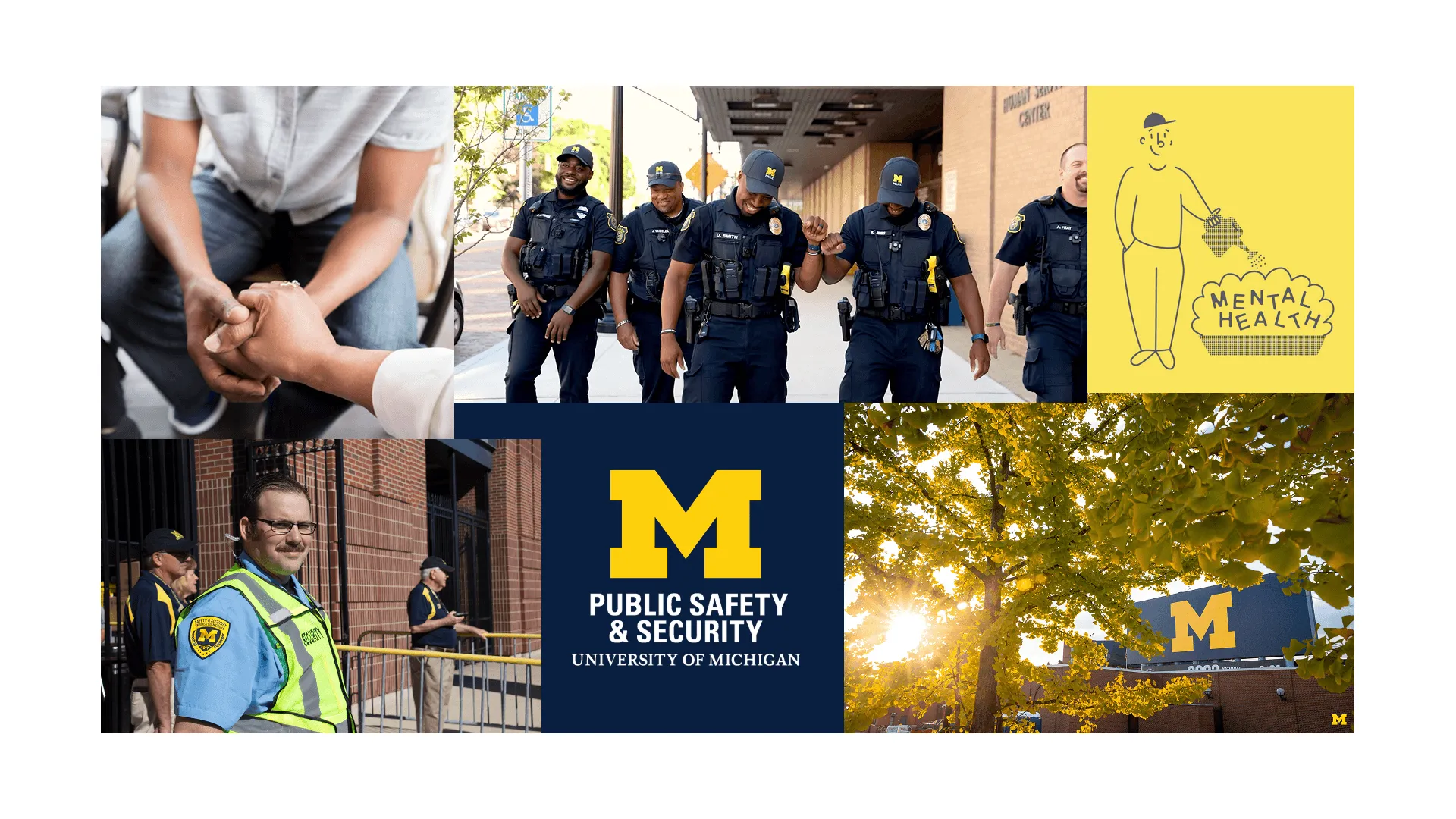
Public safety recruitment materials often feel institutional and intimidating. We started with a mood board to humanize DPSS while maintaining professional credibility.

- ColorUMich blue with complementary earth tones
- ImageryAuthentic photos of DPSS staff in community settings
- ToneProfessional yet approachable, avoiding corporate coldness
How the mood board helped us
- Visualize ‘approachable professionalism’ before designing a single screen
- Align stakeholders on emotional tone early in the process
- Establish visual guardrails for our design system
- Bridge the gap between UMich’s brand guidelines and DPSS’s unique community-focused identity
This foundation ensured our final designs didn’t just function well; they felt right for the audience and organization.
Design system
We established a custom design system using DPSS’s official assets: a unified visual language and reusable building blocks to accelerate prototyping and maintain consistency across the entire microsite.

- Brand FoundationFormally defined the color palette, typography scale, and logo usage.
- Interactive ComponentsBuilt reusable UI elements like hover-aware buttons and interactive accordions.
- Style GuideDocumented styles for headings, body text, and interactive states to streamline high-fidelity design.
Wireframing
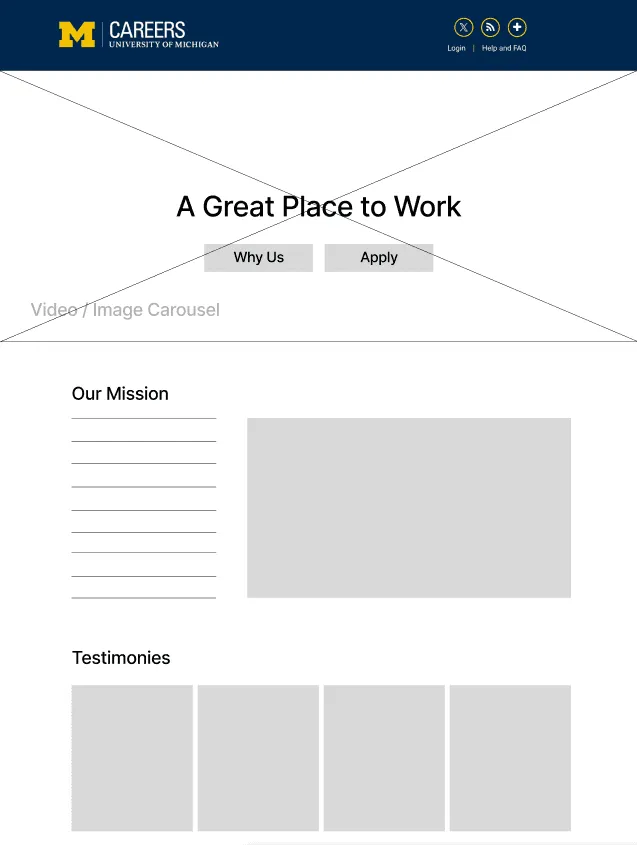
Our low-fidelity wireframes focused on solving specific pain points before adding visual polish: information architecture, content hierarchy, and user flow.
Homepage
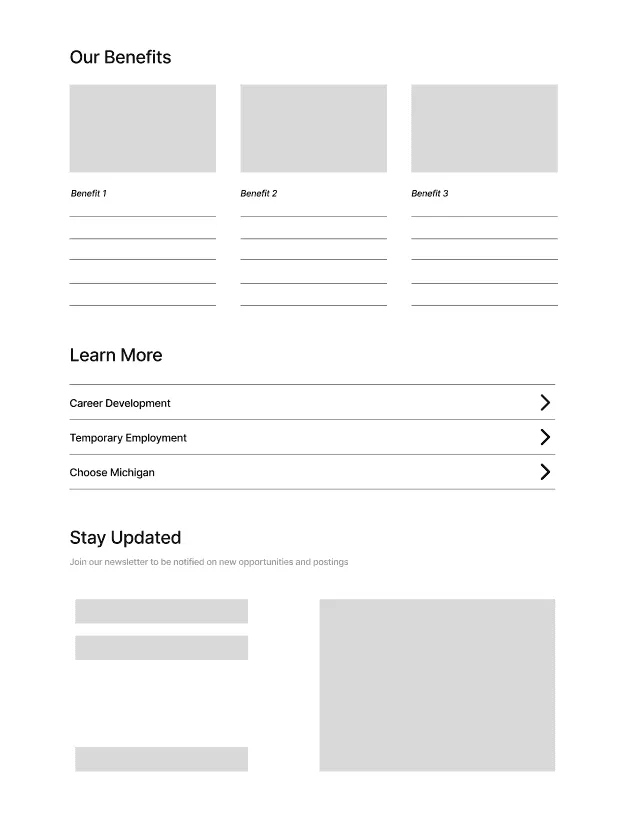
The goal was to make DPSS’s community-centered brand feel immediate and accessible, not overwhelming, built on the principle of progressive disclosure.

Homepage, top

Homepage, bottom
- High-Level Summary FirstPresents only the core value proposition and key information points upfront.
- Strategic Use of DropdownsTucks detailed content behind interactive elements, allowing users to "pull" information as they need.
- Visual & Textual BalanceUses spacing and clear groupings to prevent dense "walls of text."
- User-Controlled DepthEmpowers readers to choose their own path, scan the overview, or dive into specifics.
Job Listings + Job Details
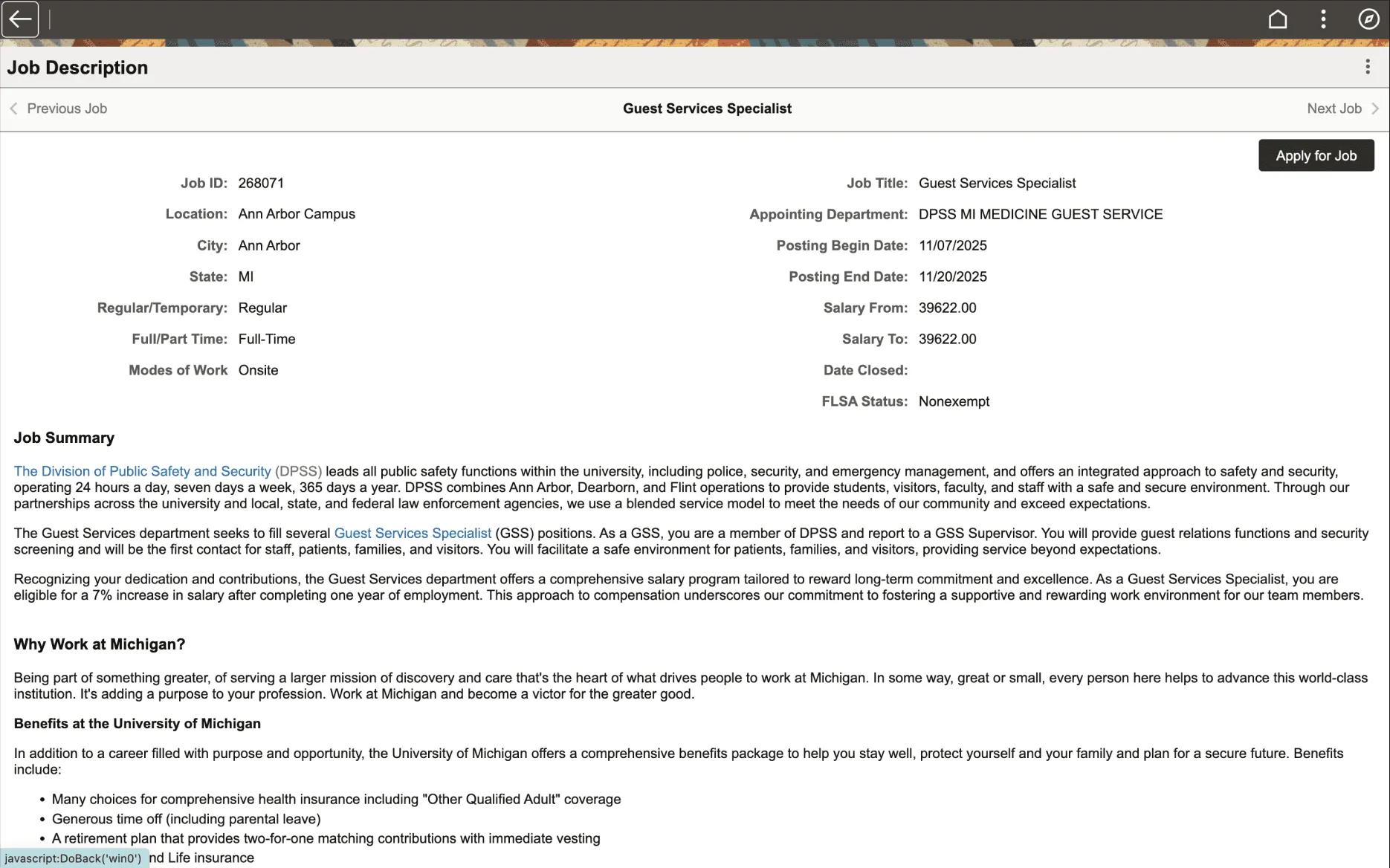
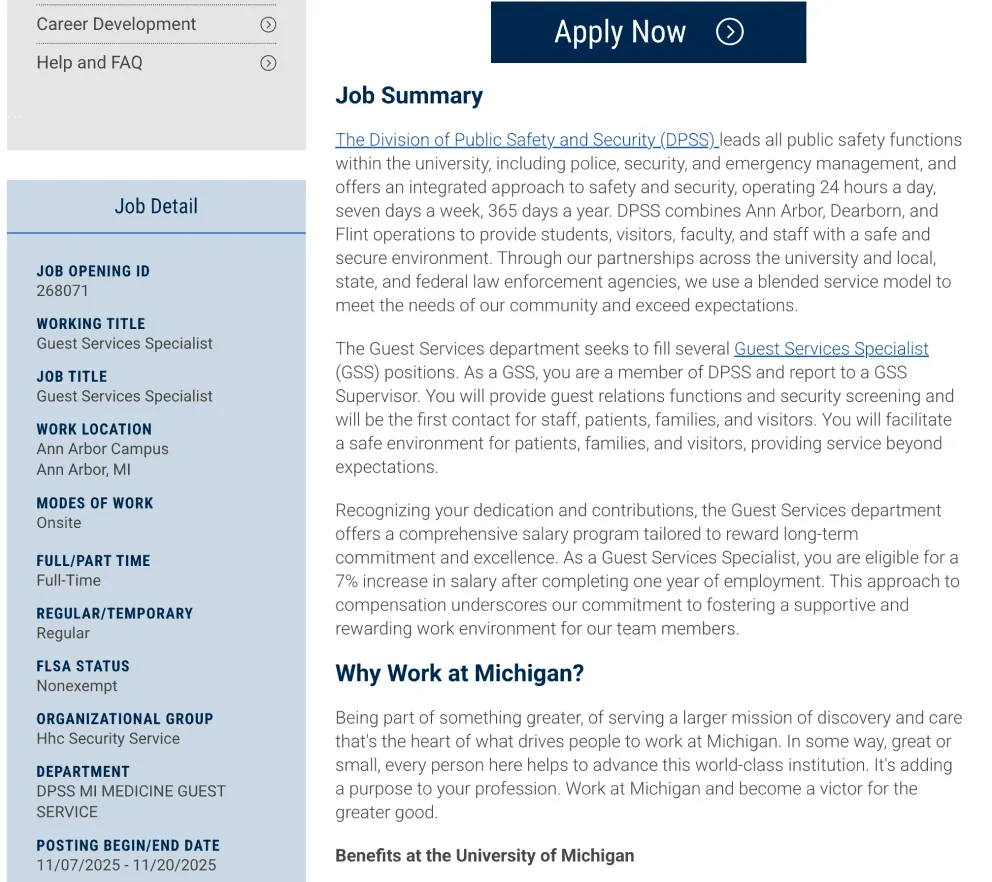
To improve the job application experience, our team identified several key issues on the existing pages:
- Repetitive, text-heavy contentAcross the job description and application.
- Broken external applicant flowIt incorrectly required UMich authentication.
- Disjointed user journeyThe application opened confusingly in a third-party pop-up.
Existing pages

Existing job description

Existing job detail
Our redesign

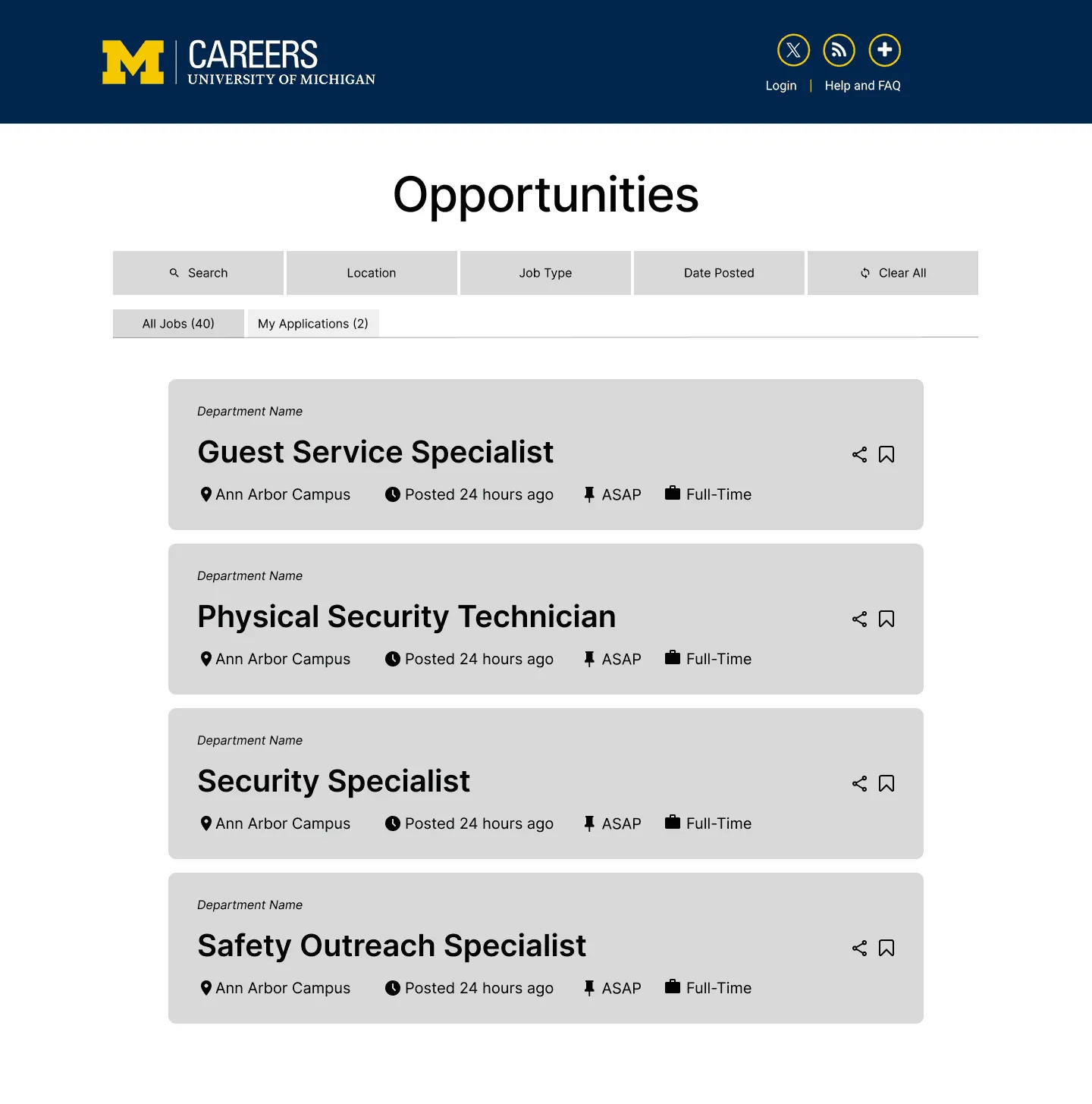
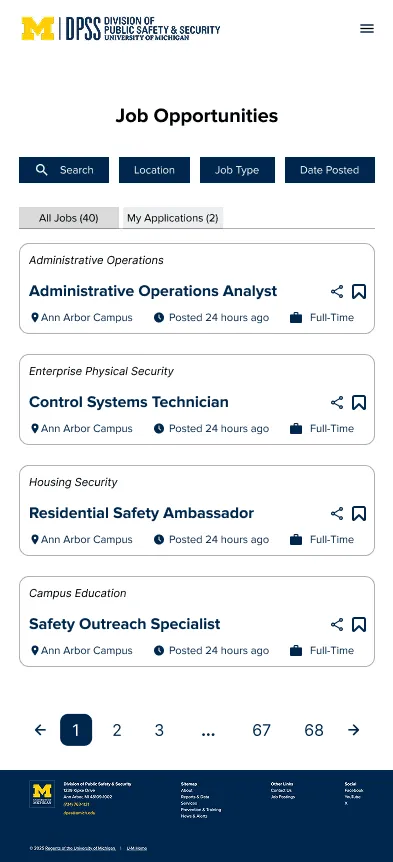
Job listings

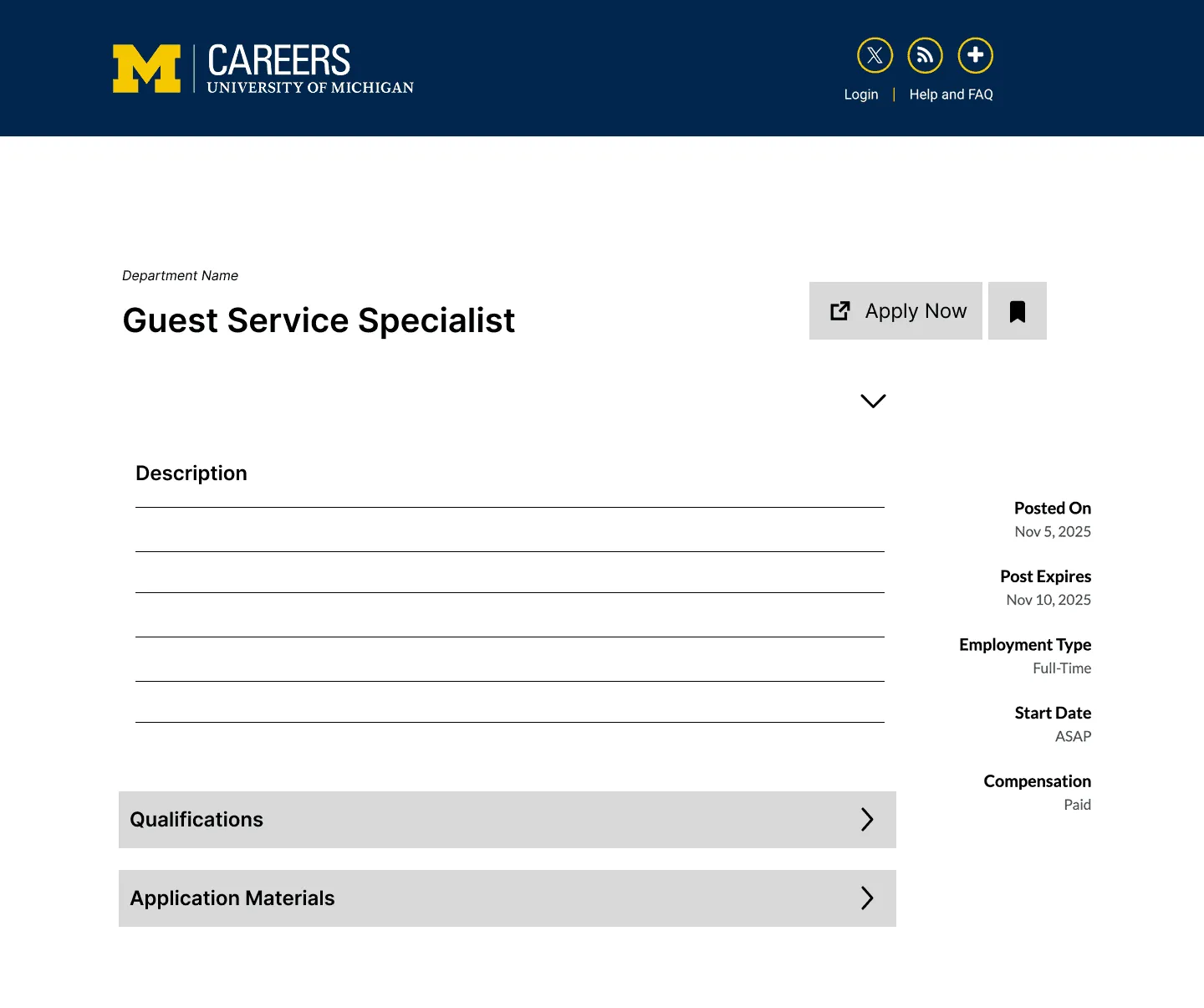
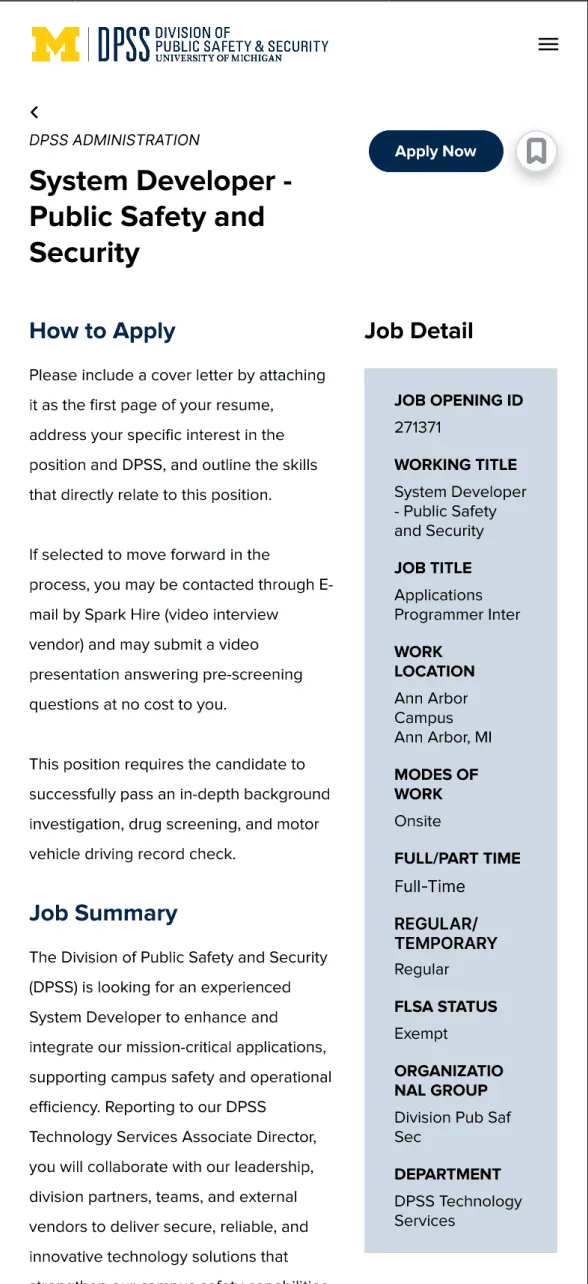
Job details
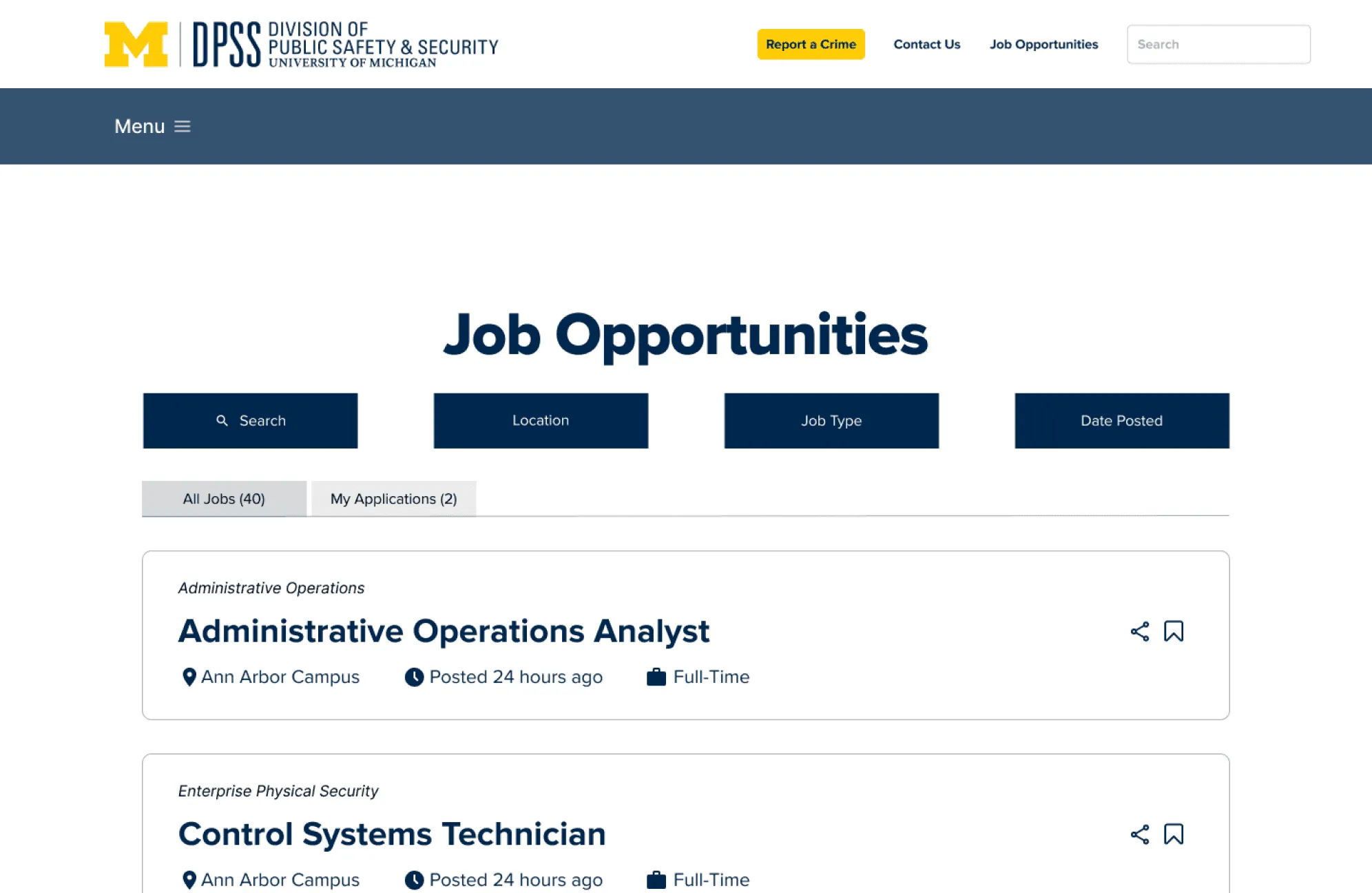
To solve this, we redesigned the listings into clear, scannable “cards” that highlight the most important details, reducing cognitive load, cutting down on repetitive text, and shortening the path to applying.
Key design decisions
- 01Clear Content HierarchyOrganized information with a "benefits first" approach to help candidates understand DPSS's culture before seeing job listings.
- Progressive Disclosure
- Information Architecture
- 02Visual Job Discovery SystemTransformed dense job listings into scannable cards with essential filters and save/share functionality.
- Cognitive Load Reduction
- User Control
- 03Streamlined Application FlowRedesigned job pages to highlight critical details with a persistent "Apply Now" button for straightforward application.
- Clear Pathways
- Action-Oriented Design
Final designs
A clickable prototype showcasing the complete careers experience, from discovering DPSS benefits to applying for positions. Designed for both desktop (1440px) and mobile (393px).
View interactive prototype(opens in new tab)
Homepage
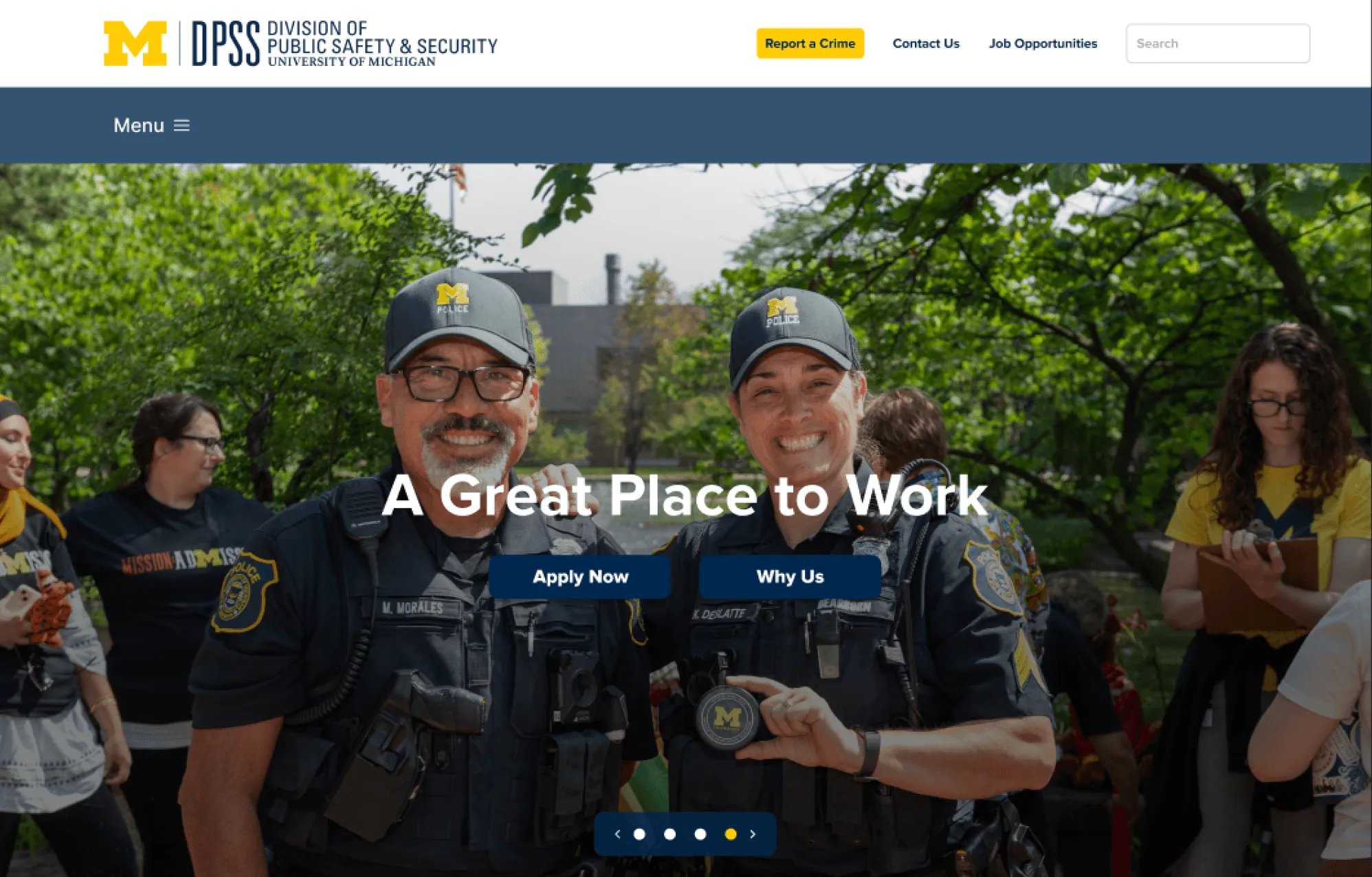
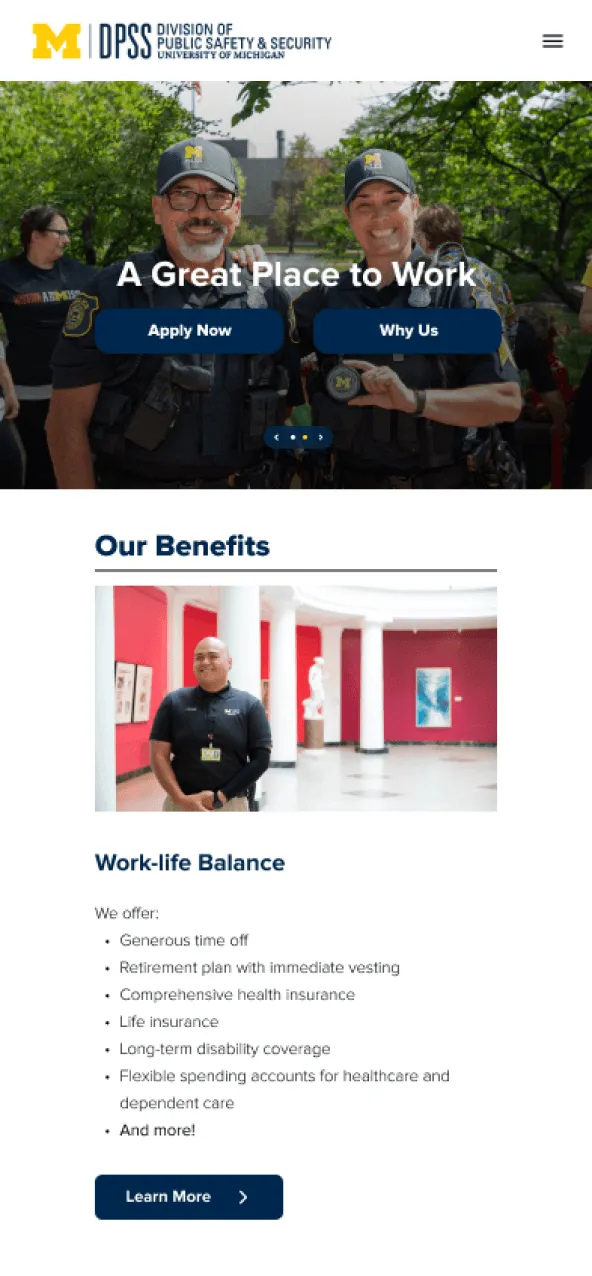
Introduces DPSS careers with community-focused imagery, key benefits, and clear pathways, communicating “A Great Place to Work” before showing job listings.

Desktop

Mobile
- Information Architecture
- Brand Storytelling
- Progressive Disclosure
Job listings
Transforms traditional job tables into scannable cards with filtering, save/share functionality, and clear categorization.

Desktop

Mobile
- Visual Hierarchy
- User Control
- Card-Based Design
Job details
A clean two-panel layout with a persistent “Apply Now” button, highlighting key details while keeping comprehensive descriptions.

Desktop

Mobile
- Content Prioritization
- Clear Pathways
- Action-Oriented Design
Results & response
The redesign transformed the recruitment experience into a more welcoming, community-focused platform. The DPSS team appreciated how the design balanced institutional credibility with approachable warmth, noting the deliverables were ready for their upcoming hiring campaign.
My top 3 contributions
- 01Led stakeholder collaboration across departmentsFacilitated clear communication between design team and DPSS.
- 02Managed parallel design workflowLed a team of 5, coordinating 4 UX designers across a 14-week timeline.
- 03Prepared implementation-ready handoffEnsured designs met brand standards and technical requirements.
Project takeaways
What made this unique
This project transformed a traditional university recruitment site into a community-focused careers destination. We redesigned within strict institutional constraints while introducing modern UX patterns, creating an experience that better reflects DPSS’s values to both internal teams and potential candidates.
What I learned as project lead
- Remote team coordination thrives on clear documentation.
- Stakeholder management means finding the balance between user needs and institutional priorities.
- Investing in a design system early pays off in consistency and speed.